A browser editor for game-theory trees, with LaTeX and image export
Draw extensive-form game trees with chance moves, information sets and payoffs, then export them as PNG, SVG or TikZ. Nothing to install and no account.
- To install
- Nothing: one page, no server, no build step
- Export formats
- PNG, SVG, TikZ, GTDraw and JSON
- Licence
- MIT
- JavaScript
- HTML
- CSS
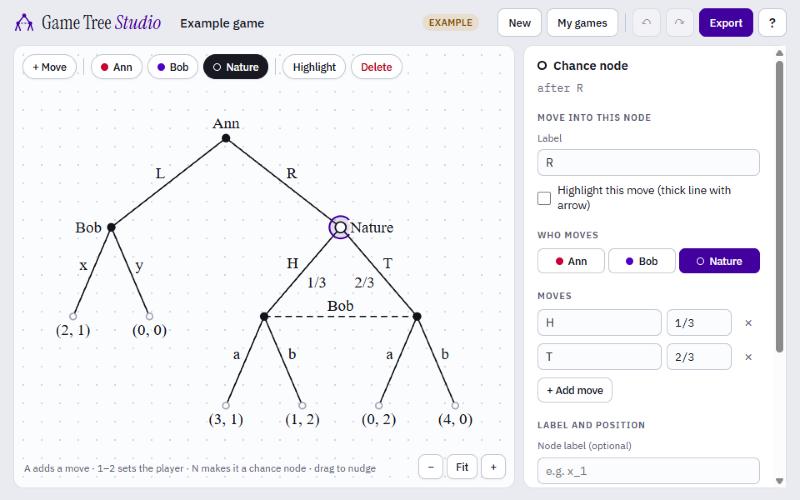
Game Tree Studio is a single-page editor for the trees used in game theory. An extensive-form game is a game drawn as a tree: each branch point is a move by a player or by chance, and the leaves hold the payoffs. It is the standard way to show who moves when and what they know. Drawing one neatly by hand or in LaTeX is slow, so this editor makes it a matter of clicks and keystrokes, then exports the result for papers, slides and course work.
What it does #
- Quick tree building. Double-click a node to add moves, press 1 to 6 to give it to a player, or N to make it a chance node.
- Information sets (nodes a player cannot tell apart). Shift-click them and press I. They are drawn as a dashed line, a dotted line or an oval, and the move labels stay in sync across the set.
- Chance moves with numeric or symbolic probabilities, such as 1/3 or 1 − π. The editor warns when numeric probabilities don’t add up to 1.
- Payoffs as expressions, with a small LaTeX-like markup for subscripts, superscripts, Greek letters and true minus signs.
- Continua of actions, drawn as an arc between the extreme choices, with one representative move and a range label.
- Highlighted moves, a thick line with an arrow, to mark a strategy profile or a path found by backward induction (solving the game from the leaves back to the root).
- Layout and notation options: top-to-bottom or left-to-right trees, spacing sliders, terminal nodes on one row, three payoff styles, round or square chance nodes, serif or sans-serif text and optional colours by player.
- Undo and redo, copy and paste of subtrees, keyboard navigation, light and dark themes, and a layout that works on phones.
Export #
- PNG at three times screen resolution, for documents, slides and course submissions.
- SVG for the web or further editing, or a copy straight to the clipboard.
- TikZ for LaTeX, with every element at the coordinates shown in the editor and simple fractions typeset as fractions.
- GTDraw
.effiles, for fine-tuning the typesetting in that tool. - JSON, the editor’s own format. Dragging a saved file onto the canvas opens the game again.
How it’s built #
One HTML page, one stylesheet and one JavaScript file that holds the tree model, the layout, the SVG rendering and every exporter. There is no build step, no server and no account. The live copy runs on GitHub Pages, and the code is MIT-licensed.
Limits #
- It draws games; it doesn’t solve them. Highlighted paths are marked by hand.
- Storage is per browser and per address. Games are kept in the browser’s local storage, so a copy on GitHub Pages and a copy opened from disk keep separate libraries, and clearing site data removes them. Saving a game file keeps a copy that opens anywhere.